Unity Reflect Annotation
Allowing users to collaborate on 3D models real-time
Project details
Tools used:
Figma . Figjam . JIRA
Team:
David Ménard: Product Manager
Christian Boutin: Engineering lead
Simon Courtemanche: Front-end developer
Nadine Boucher: Program Manager
Angela Case: Documentation lead
My role:
Lead and solo designer of the product - discovery, user research, design, testing.
Outcome:
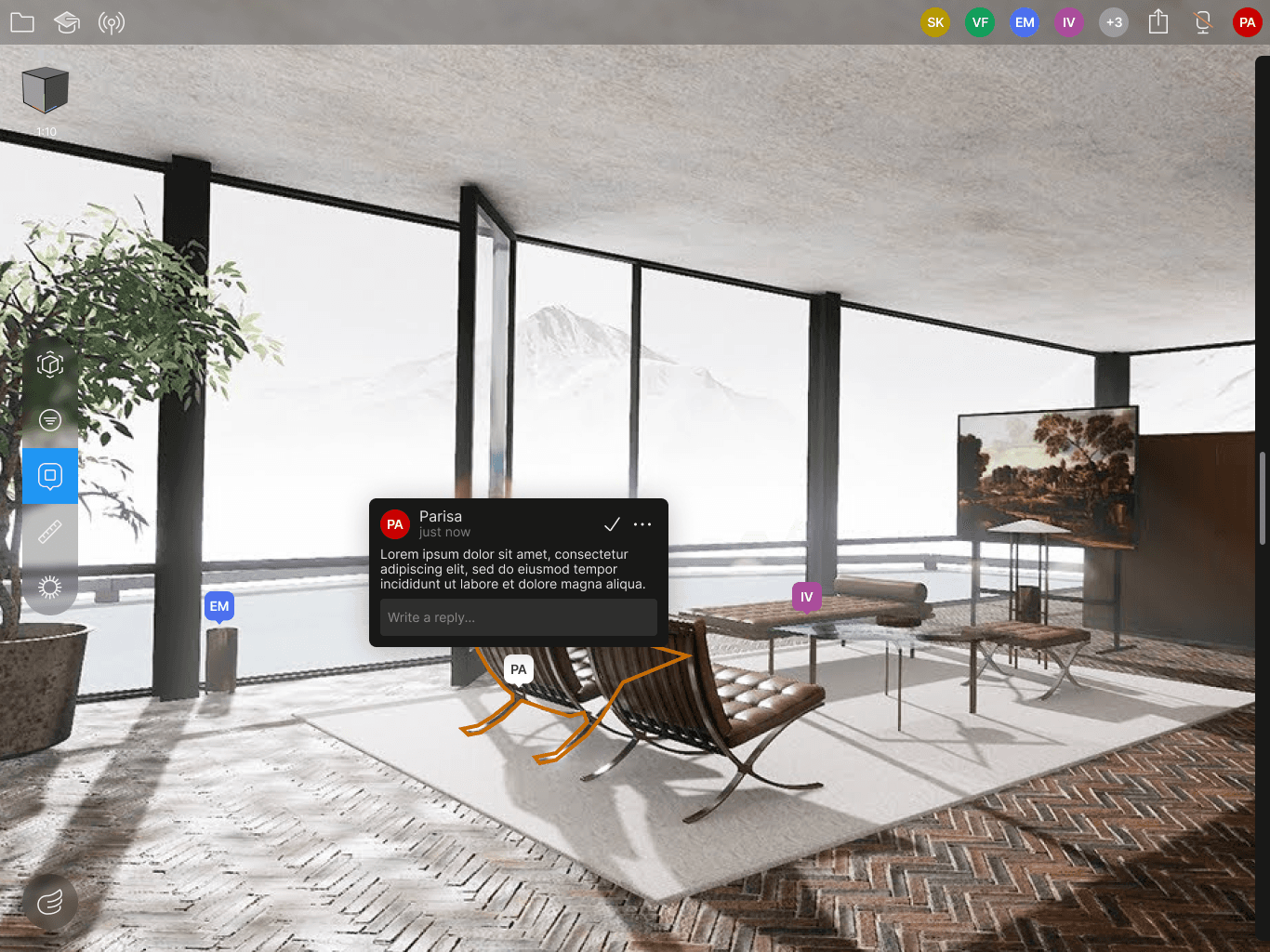
To address the need for tracking discussions and issues during design reviews, I designed Unity Reflect 3D Annotation feature. This feature enables architects and stakeholders to monitor discussions and issues in real-time, resulting in faster decision making and cost saving.
What is Unity Reflect?
Unity Reflect is a suite of products that helps users connect Building Information Model (BIM) data, stakeholders, and every phase of the Architecture, Engineering and Construction (AEC) lifecycle in one immersive, collaborative real-time platform. It enables better communication and facilitate faster, more impactful decision-making to win bids, catch mistakes early, prevent injuries, and more.
Key benefits of Unity Reflect
- Identify mistakes earlier: Bring multiple models and their metadata together to facilitate more efficient collaboration with project stakeholders, catch mistakes early, and avoid costly rework.
- Faster decision-making: Generate interactive, immersive experiences that are linked to the original design models in Revit, BIM 360, Navisworks, SketchUp, and Rhino.
- Multiuser collaboration: Drive alignment around design decisions with multiuser collaboration to avoid misunderstandings and errors. Share a project link to stakeholders and walk through the model together in Follow Mode, add annotations, and see what other users are seeing in real-time.
- Any platform, anywhere: The ability to make changes to projects on-premise or in the cloud enables greater collaboration with users outside of your network. View large models on any device or platform, including VR, AR, iOS, Android, PC, and Mac.
- Communicate design intent: Conduct sun studies, overlay models in 1:1 AR at scale (marker-based or tabletop), and filter BIM data to effectively communicate design intent to stakeholders.
- Enable more aha moments: Create immersive, multiuser environments to perform collaborative project walkthroughs in VR and AR. Wow clients in VR or high-powered GPU desktop applications with high-definition graphics.
Design Process
Discovery
Goals of this phase
- Align on project goals and limitations
- Empathize with our users
- Define the problem(s) we are solving
User interviews
During the discovery phase of the project, I conducted user interviews to identify pain points users face when tying to accomplish their task in Unity Reflect. These interviews were done during our bi-weekly user feedback meeting. Our open-ended conversations during these interviews revealed these findings:
- Real-time collaboration in pre-construction stages is crucial for seamless project execution.
- Engaging on a regular basis builds trust with owners and speeds up customer buy-in
- Finding mistakes early prevents costly rework
- Design tools and documents are inaccessible to non-technical stakeholders
Problem
From the findings of these interviews, a Product Requirement Document (PRD) is created by the Product Manager (PM). This document roughly defines the problem, which in summary goes as follows:
During design review, Architects and stakeholders need a way to track discussions and issues that have been risen during the discussion. It enables teams to share instant updates, identify issues early, and make informed decisions collaboratively.
Our personas are:
- Architect: Conveying design intent to non-technical stakeholders and capturing stakeholders feedback early in design process
Goal: to deliver what the customer needs in a timely manner and be efficient while working on multiple projects at the same time. - Project Manager: Manages entire project from design through build: identify project scope, hire vendors, share design/build requirements with Architect.
Goal: to have an overview of the project timeline and can estimate delivery time. - Occupant: Provides feedback on designs. Has challenges with understanding technical models especially when delivered in 2D, CAD or PDF format.
Goal: to make sure that the final version of the project is what they want it to be.
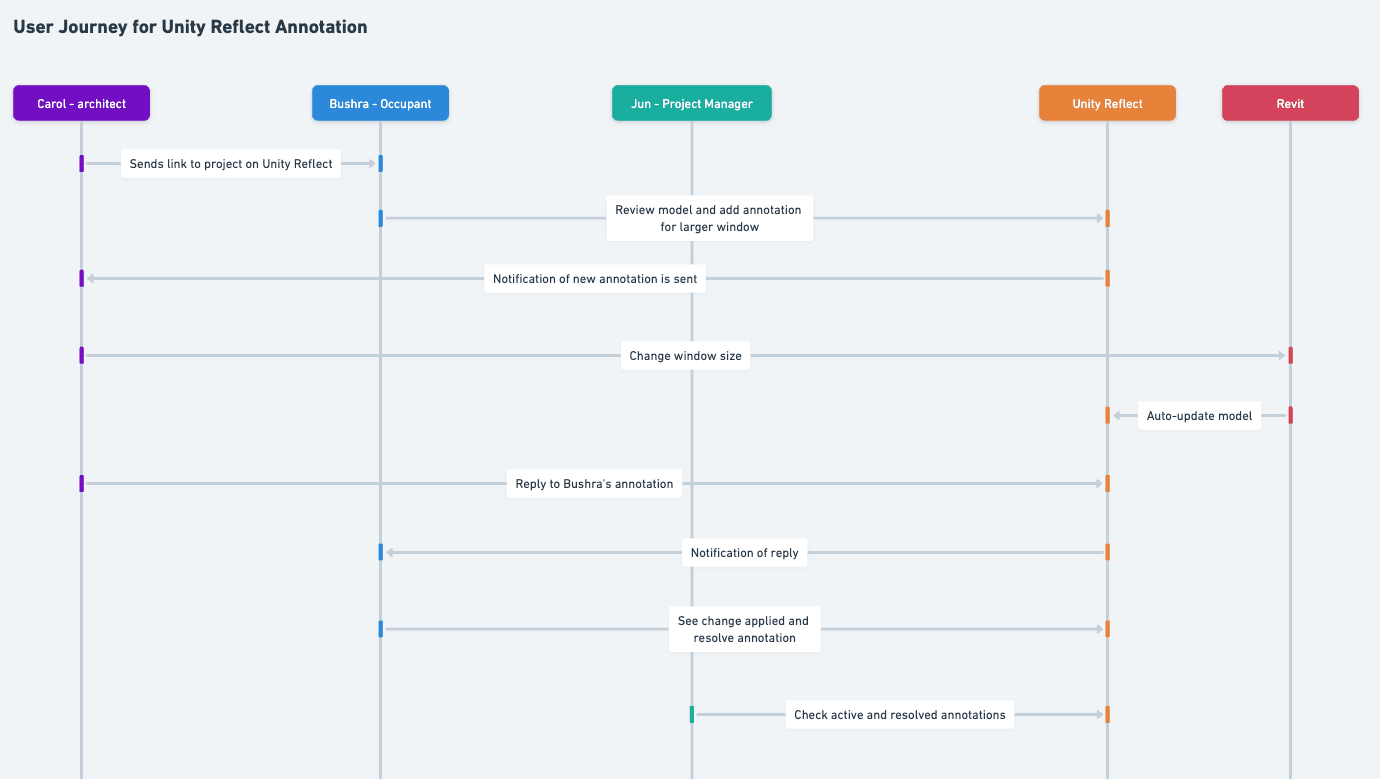
I worked on creating the user journey based on the data from user interviews and competitive analysis.
P0 Requirements
Based on the user journey, I identified these user flows as highest priority to create the Minimum Viable Product:
- Users should be able to add an annotation that's attached to an object on the 3D model. They should be able to edit/delete it.
- Users should be able to reply to an annotation. They should be able to edit/delete it.
- Users should be able to resolve their own annotation.
- Users should be able to see a list of resolved annotations.
Exploration
Goals of this phase
- Generate ideas
- Prototype solutions
- Test with users and internal teams
- Review and iterate
Prototype solutions
Using Figma and components from our design system I translated the user flows identified in the previous phase into low-fidelity wireframes. At this stage, the wireframes were defined enough for some user testing.
Review and iterate with users
I tested the wireframes during our bi-weekly user group meeting. The feedback highlighted the need for easier navigation between annotations and their original views. As an example, we had to add one more P0 requirement:
- Users should be able to quickly switch to the view from which the annotation was originally created.
Also, some quality of life features were suggested by our beta users, such as:
- Ability to snap the annotation to corners or edges of a 3D object
- Ability to magnify where the annotation is placed for more precise placement
- Adjust the behaviour of annotation pin based on the device (tablet vs. desktop) - image below
Review and iterate with internal stakeholders
I also peer reviewed the designs with my design team and the design system team and iterated on some patterns regarding the information architecture for this feature.
Ship
Goals of this phase
- Perform a technical handover
- Bug bash and check quality
- Dogfood and test internally
- Conduct engineering demos
- Define metrics to measure on launch
Technical handover
I prototyped the flows on Figma and added spec-lining to hand over to the engineer. I was closely involved with the engineering team assigned to this project through regular meetings (2-3 times a week sometimes) to address any question on the designs as well as design for edge cases.
Demo
I tested the product on staging throughout the implementation and bug bashed various times to ensure the final quality and the details meet the designs. One example of a detail I uncovered during these testing sessions was the orientation of the annotation pins. We iterated on them with the engineers making sure the final experience is enjoyable and intuitive.
Covering edge cases
As with every other feature, during the review and implementation phase, we discovered various edge cases, such as variant screen sizes, user roles, and error scenarios. I addressed all of these and provided the team with detailed designs to implement.
What I learned from this project?
- Iterate. Iterate. Iterate.
- This was my first time following this design process. I learned a lot about maintaining a structured approach while also being adaptable.
- I at first undermined the power of detailed spec-lining but after many sessions with the engineer I realized it's very important to record every detail for their reference.