Unity Cloud Asset Versioning
Designing version control workflows for 3D assets in collaborative game development pipelines
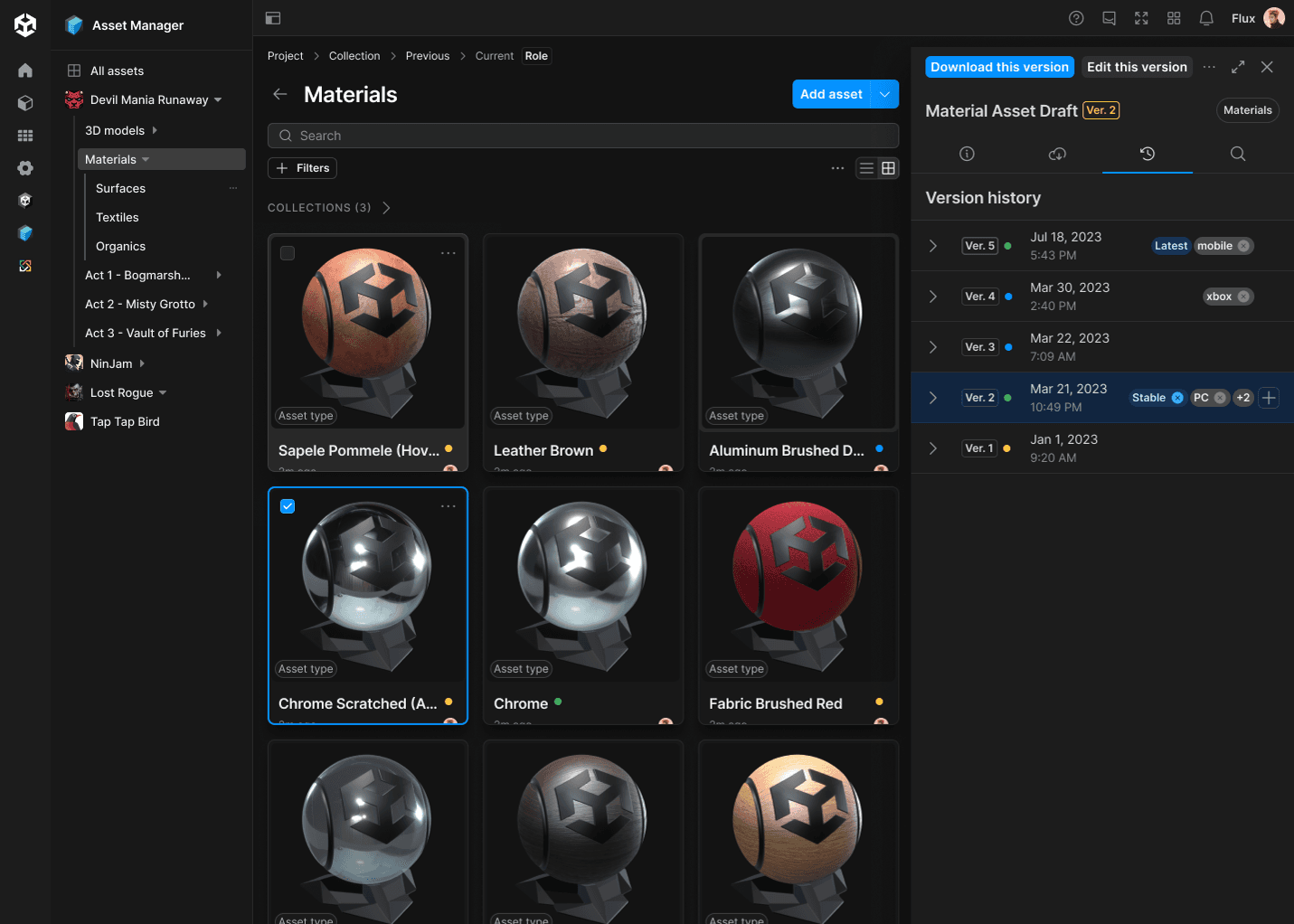
Project details
Tools used:
Figma . Figjam . JIRA . ProductBoard
Team:
Eoghan O'Sullivan: Product Manager
Sean Totterdell: Engineering lead (team of 5 engineers)
Chris Yazbek: Program Manager
Angela Case: Documentation lead
My role:
Lead and solo designer for this feature. Collaborated with design system designers.
Outcome:
Content creation in gaming, industrial verticals, and VFX is iterative and team-driven, often requiring approval from a small group of leads. In this design project, through iterative design I simplified tracking the lifecycle and review cycle of assets.
What is Unity Cloud Asset Manager?
An extensible, cloud-based digital asset management (DAM) solution specializing in robust 3D asset management to increase discoverability, reusability, and ROI of content across your organization.
Problem
The problem of easily storing, categorizing and sharing assets within a RT3D organization expands and compounds as the amount of people, projects and assets grow. This creates a corresponding growth in the inefficiencies and costs that creep into an organization. Teams often complain of not being able to find existing assets, get them into the right format or even know if they have the right license. All of this blocks collaboration across projects and this in turn drives a duplication of efforts and assets.
Design process
Discovery
Goal of this phase
The most common problem we face as a product team is building the wrong thing. The Discovery phase is intended to ensure we get started on the right path to creating solutions that match our user's needs and help them achieve their goals.
User Personas
The two primary user groups that feel this pain are:
1: Users in gaming or industrial studios who need to manage, track and control access to their organization's content
2: Users in gaming or industrial studios who need to discover, contribute and collaborate on this content.
Solution Hypothesis
By building out a feature stack that enables users of an organization to securely share their content from project to project, as well as easily collaborating and tracking the lifecycle of this content, we will reduce the inefficiencies and costs for organizations as they grow.
Tracking the lifecycle of assets = Asset versioning and version control
Asset Versioning feature definition
Asset Versioning ensures teams can safely make changes to assets without disrupting projects. Users can increment a new version of an asset with ease, while still accessing old versions through a powerful labeling system. This system complements existing Version Control Systems like Perforce without replacing them.
User interviews
Now that the feature is roughly defined, I conduct user interviews to learn about users' experience versioning RT3D assets to define user flows. Some of the questions I asked during these interviews are:
- Can you walk me through your typical workflow when it comes to versioning RT3D assets?
- How do you determine when to create a new version of an asset?
- Can you describe a recent scenario where you needed to revert to an older version of an RT3D asset? What was that experience like?
- What features or capabilities would you find most helpful in a versioning system for RT3D assets?
- How do you currently keep track of changes made to RT3D assets by different team members?
- What criteria do you use to determine which version of an asset to use for a particular project or task?
- What challenges do you currently face when versioning RT3D assets, if any?
- What is an ideal versioning system for your RT3D asset management needs?
User journey
From the insights of these interviews, I worked on creating a user journey for asset versioning. I then presented it to the other stakeholders and after iterating on their feedback, here is the final version:
- Uploading a New Asset: Sarah, a 3D artist in a gaming studio, has just finished working on a new character model for an upcoming game. She uploads the asset to the Asset Manager, knowing that she can easily keep track of its versions and revisions.
- Versioning the Asset: After receiving feedback from her team lead, Sarah makes some changes to the character model. Using the Asset Versioning feature, she increments a new version of the asset with a brief description of the changes made.
- Labeling for Organization: To ensure easy access to previous versions of the asset, Sarah labels the older version as "Initial Design" and the new version as "Revised Design". This labeling system helps her and her team members quickly find and reference specific versions when needed.
- Continued Collaboration: Sarah's colleagues, including animators and game designers, can access the Asset Manager to view the latest version of the character model. They can provide feedback and collaborate, knowing that they're working with the relevant version of the asset.
Explore
Goal of this phase
Finding the right solutions to our problems is not easy. The Explore phase is intended to ensure we utilize collaboration, reviews and feedback to achieve a design vision that we are confident to ship to our users.
User flows
- Users should be able to find out what version number any asset has and see version number increases when making changes to the asset
- User should be able to select older versions of any asset on version history and find out the details of the old version of asset
- User should be able to retrieve any older version and make it the working version of the asset
- User should be able to add a version label from organization library to any version
- User should be able to filter on assets list based on version labels
Wireframes
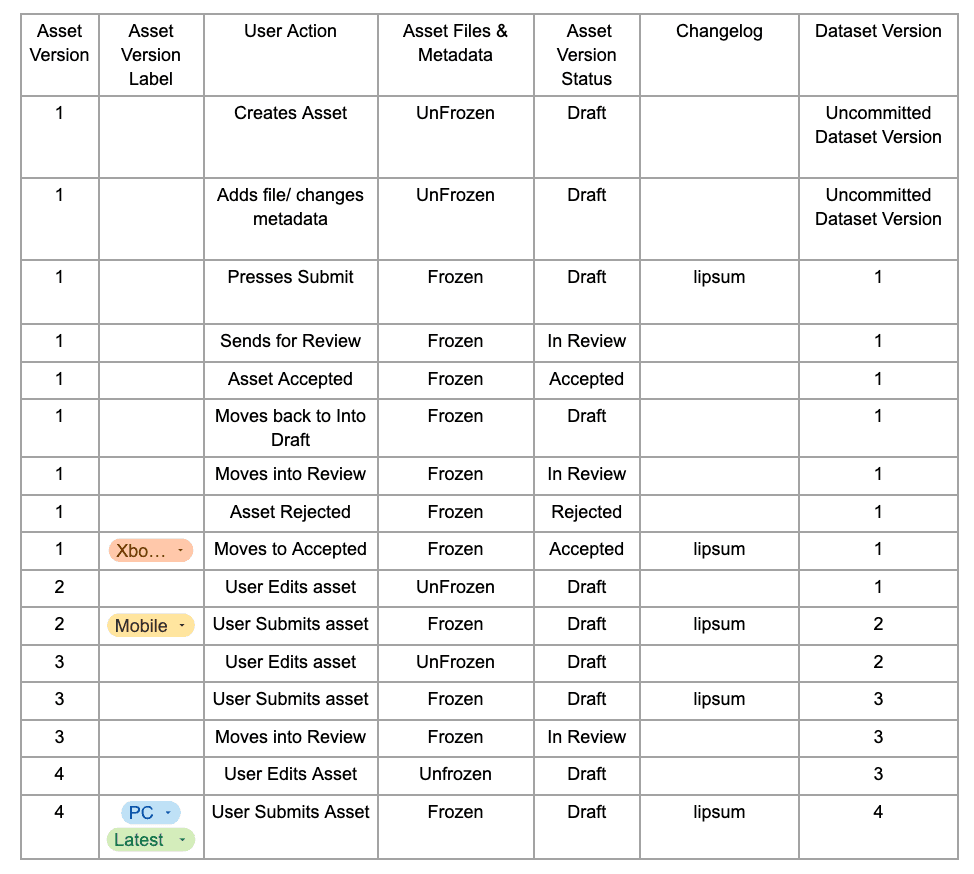
I started with wireframing the logic of how "Asset version", "Asset version label" and "Asset version status" will work together. I peer reviewed this with the other stakeholders.
User testing and iteration
I iterated on the wireframes and presented them frequently for peer reviews and stakeholder reviews. Through these reviews, I uncovered gaps in the designs and fixed them.
I'm going through one example of how these reviews and user tests helped us improve the user experience of this feature.
Take this user flow:
User should be able to retrieve any older version and make it the working version of the asset
After testing this design with our beta users, as well as stakeholders review, I realized this design is creating confusion. Users commented that:
- "I clicked 'Retrieve this version,' but now I'm not sure if I've overwritten the current version or not."
- "It's not clear what happens when I retrieve an older version. Does it replace the current version or create a new one?"
- "I thought 'Retrieve this version' would simply show me the older version, but now it seems like it's changing something."
- "I'm hesitant to use 'Retrieve this version' because I'm not sure if it's reversible or if it permanently changes the current version."
Ship
Goal of this phase
The Ship phase is intended to ensure we deliver quality products and services that enhance the reputation of Unity and provide joyful experiences for our users. We continuously improve upon shipped products by collecting feedback and acting upon this in future releases.
Handoff
I expanded the user stories and added a lot more details to them. I added spec-lines on figma detailing all the expected behaviours so that the engineering team can use it as the single source of truth.
What I learned from this project?
- Got really good at juggling tasks to keep everything on track
- Learned to contribute effectively to growing and refining our design system, ensuring consistency and efficiency across projects.
- Practices presenting designs regularly to clients and internal stakeholders so we're all on the same page.
- Discovered how to navigate uncertainty, leading the charge in designing flows even when we didn't have all the answers.