Generic Content Browser for Autodesk M&E Products
Designing a unified content browsing experience across Autodesk Media & Entertainment products
Problem Statement
Teams across Autodesk's Entertainment & Media Solutions were each building their own content browsers—resulting in duplicated effort, inconsistent user experiences, and fragmented workflows across DCCs and Flow-native apps. Artists needed a unified, responsive, and extensible way to browse, search, filter, preview, and drag-and-drop assets from diverse data sources (Flow, cloud, local, NAS, custom storage) regardless of the application they were in.
At the same time, product teams required a scalable, configurable foundation that could support both common requirements and domain-specific needs (e.g., USD components, shaderball previews, PBR material maps). The challenge was to design a single, modular Generic Content Browser built on Weave—Autodesk's design system—that could deliver a cohesive experience across products while being flexible enough for each team to extend without breaking consistency.
Analysis of existing browsers
The design process began with a thorough evaluation of Autodesk's internal ecosystem of existing content browsers, revealing significant fragmentation across teams such as Kitbashing, USD, Bifrost, LookdevX, Flow, and Asset Management.
Comparative reviews of these browsers highlighted valuable strengths like robust metadata visibility or large-dataset handling, but also exposed gaps including inconsistent navigation patterns, lack of responsiveness, limited extensibility, and outdated visual design.
I also looked at how other organizations within Autodesk had tackled the same problem of fragmented, inconsistent browsers and built a unified browsing experience. The Autodesk Libraries Platform (ALP) was one of them. However, ALP lacked the flexibility around data sources and alignment with the unique needs of M&E workflows and artists, so while we couldn't adopt it directly, it served as a valuable source of inspiration. Together, these evaluations solidified the need for building a Generic Content Browser for Autodesk M&E products.
Competitive Audit
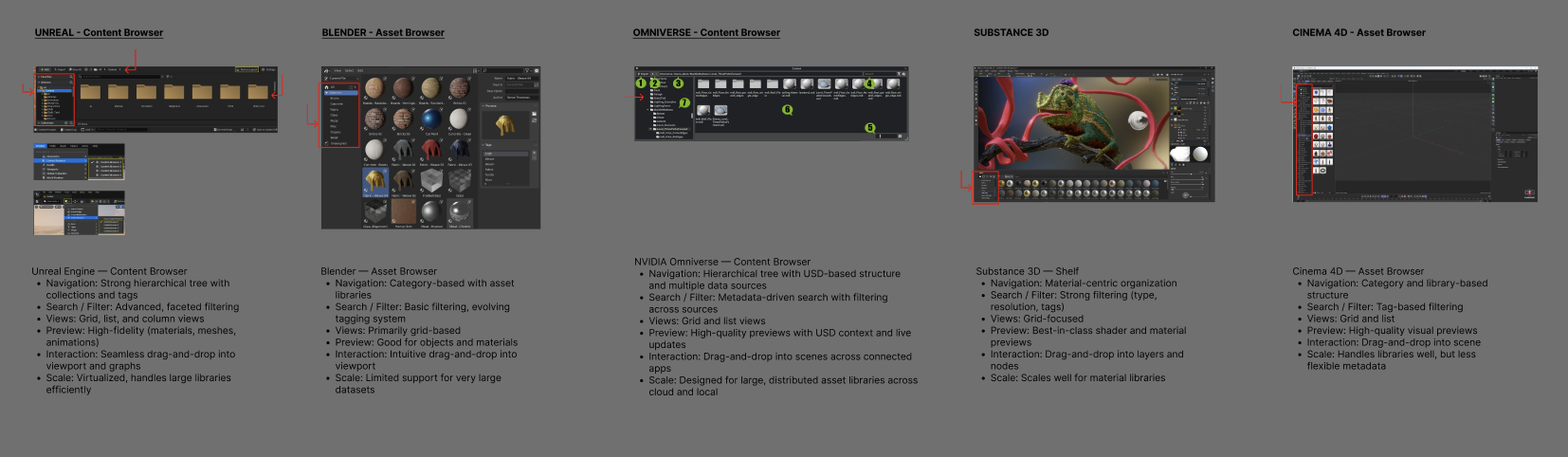
I also examined existing browsing experiences across industry tools—including Unreal Engine's Content Browser, Unity's Project Window, Blender's Asset Browser, Cinema 4D's Asset Browser, Houdini's Gallery, and Substance 3D's Shelf—to understand common workflows around navigation, metadata preview, and handling large asset libraries.
After extracting these essential workflows, I fragmented them into their building blocks (tree views, grid/list switching, filtering, preview paradigms, drag-and-drop) to identify which interaction models consistently supported efficient asset discovery.
| Pattern | Blender | Houdini | Cinema 4D | Substance 3D | Unreal | Unity |
|---|---|---|---|---|---|---|
| Dual-pane layout (tree + content) | ✓ | ✓ | ✓ | ✓ | ✓ | ✓ |
| Grid/List view toggle | – | – | ✓ | – | ✓ | ✓ |
| Adjustable thumbnail size | – | – | ✓ | – | ✓ | ✓ |
| Text search + type filtering | ✓ | ✓ | ✓ | ✓ | ✓ | ✓ |
| Preview / detail panel | ✓ | ✓ | ✓ | ✓ | ✓ | ✓ |
| Drag and drop into scene | ✓ | ✓ | ✓ | ✓ | ✓ | ✓ |
| Breadcrumb navigation | – | – | ✓ | – | ✓ | ✓ |
| Favorites / collections | – | – | ✓ | – | ✓ | ✓ |
| Metadata (name, type, tags) | ✓ | ✓ | ✓ | ✓ | ✓ | ✓ |
This exploration helped us recognize gaps in current approaches, validate user expectations, and define a clear set of reusable patterns that could form the foundation of a unified, extensible content browser. Key takeaways: the dual-pane layout with drag-and-drop is universal and non-negotiable; grid/list toggle with adjustable thumbnail sizes is expected by power users; and breadcrumb navigation with favorites/collections significantly improves asset discovery in large libraries.
User journey and prototype
Now it was time to sell this idea to the organization. To validate the concept and build alignment, we created an "ideal user journey" prototype and took it on a cross-team roadshow. Together with my design manager, a PM, and a PO who volunteered to champion the initiative, we met with all EMS teams who either owned or needed a content browser—USD, Kitbashing, Maya Foundation, Flow Asset Management, Bifrost, and LookdevX.
Each of these teams had built their own isolated, often inconsistent browsers, so our goal was to introduce the vision for a consistent, Weave-based browsing experience and demonstrate how a shared design system could streamline workflows across products.
These sessions allowed us to review the prototype collaboratively, collect both generic and domain-specific requirements, surface unique technical constraints, and build momentum toward a unified solution. Beyond gathering feedback, this "tour" served to build alignment in an environment with many PMs, multiple stakeholder groups, and varied priorities. As a result, a dedicated engineering team was formed called Flow Front-end SDK (FFESDK) to bring the Generic Content Browser to life.
Requirements
- Data source must be configurable (Flow, Cloud, Local, NAS, custom data storage, etc.)
- UI and functionality must be configurable/extensible
- UI must be responsive
- UI must be able to support many assets (i.e., pagination, lazy loading, etc.)
- UI must show an empty state when the connection to the data source fails
- User must see and switch between gallery view and list view
- User must have the option to choose thumbnail size
- User must be able to search objects
- User must be able to see the name, size, and file type of the objects
- User must see a preview of a selected object that shows a larger image and metadata
- User must be able to filter objects
- User must be able to sort objects
- User must be able to view, browse, and change the source location (directory/project)
- User must be able to set and view objects as favorites
- User must be able to drag and drop one or multiple objects into their scene
- User must have options on how objects get dropped into scene (import, reference, replace, etc.)
- User must see the thumbnail dimmed when dragging into the scene
Story mapping and defining MVP
After completing the multi-team tour and consolidating all generic and team-specific requirements into a comprehensive list, I partnered with engineering to run a structured story-mapping exercise. In this session, I stepped into a PM role—guiding the team through evaluating each requirement based on user value, feasibility, and cross-product impact. This helped us separate essentials from nice-to-haves and clearly define the MVP.
Once we defined the MVP, I ran another prioritization session with the team to break it down across the remaining sprints. I stepped in as both a PO and an interim scrum master to help keep things clear and moving. We focused on what needed to ship first, what could wait, and how everything fit together over time. This helped us turn a pretty complex, multi-team vision into a concrete plan we could actually execute on—making sure we delivered the most valuable workflows early, while still leaving room to expand later.
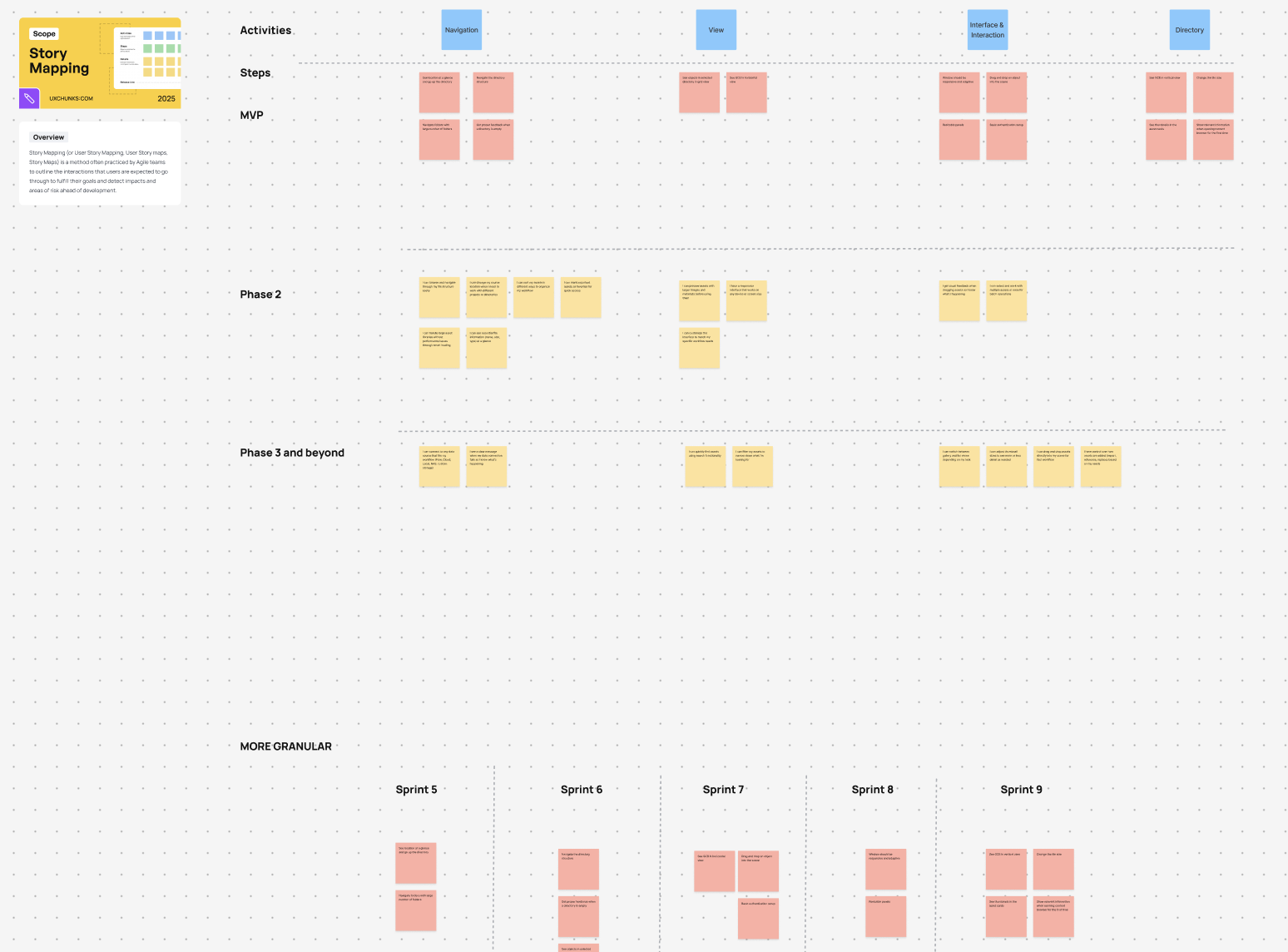
Requirements for MVP
- As a user I want to see the location at a glance and go up the directory
- As a user I want to see the objects in selected directory in grid view
- As a user I want to navigate the directory
- As a user I want to see GCB in horizontal view
- As a user I want to see GCB in vertical view
- As a user I want to change the tile size
- As a user I want the window to be responsive and adaptive
- As a user I want to drag and drop an object into the scene
- As a user I want to navigate folders with large number of folders in them
- As a user I want a basic authentication setup
- As a user I want to get proper feedback when a directory is empty
- As a user I want resizable panels
- As a user I want the content browser to show me relevant information when I open it for the first time
- As a user I want to see thumbnails in the asset cards
High-fidelity designs and handoff
Once the MVP and sprint roadmap were defined, I transitioned into execution by creating detailed user stories in JIRA and linking each one directly to its corresponding Figma designs. I stayed embedded with the engineering team throughout implementation—joining daily scrums, answering questions in real time, clarifying edge cases, and co-creating solutions whenever technical constraints required design adjustments.
I intentionally worked one to two sprints ahead, ensuring designs, flows, and acceptance criteria were always ready before development picked them up. In parallel, we established a bi-weekly stakeholder review where we showcased actual implementation progress rather than mockups. This allowed all adopting teams—USD, Kitbashing, Maya Foundation, Flow Asset Manager, Bifrost, and LookdevX—to see the Generic Content Browser materialize sprint by sprint, provide timely feedback, and build confidence in the direction and quality of the work.
Scroll and zoom within the viewer, or open full screen for more details
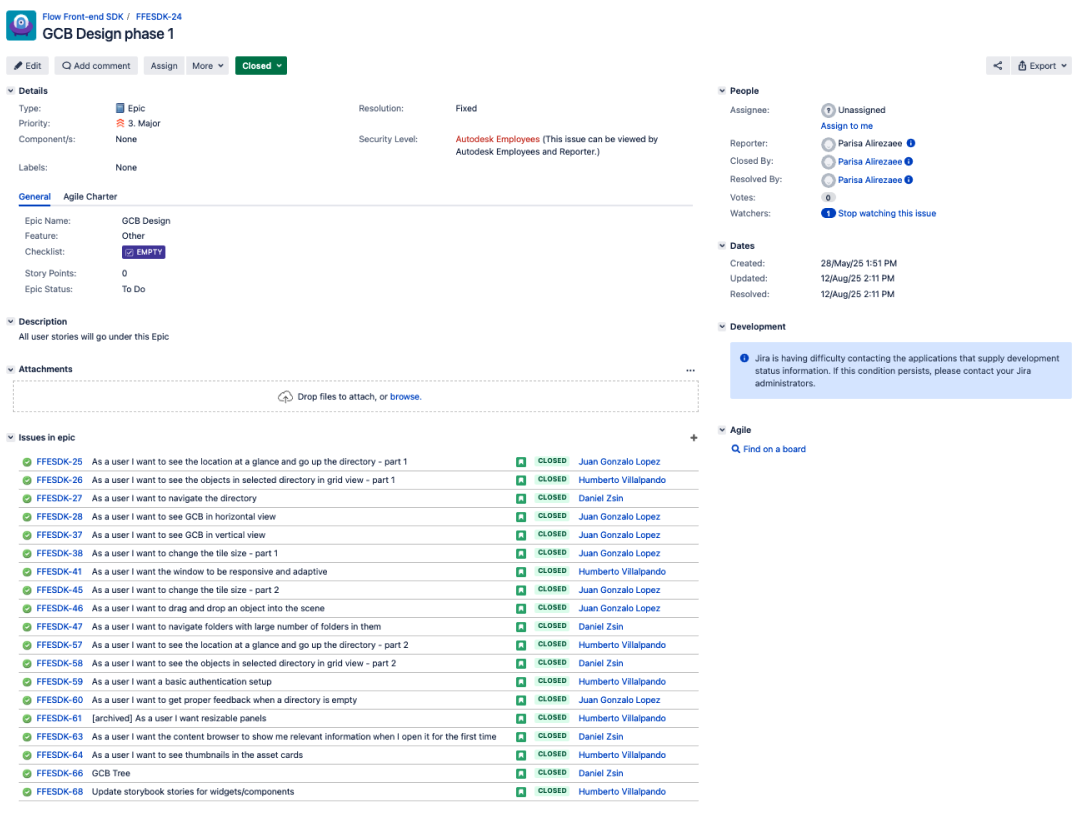
JIRA tickets created for the engineering team backlog
What I learned
- Achieving a consistent user experience across products requires not only good design, but persistent advocacy and hands-on collaboration with every team involved to co-create the solution.
- The value of flexibly wearing different hats—designer, PM, PO, and scrum master—to keep a complex, cross-functional project aligned, prioritized, and moving forward with clarity.
- Showing real, continuous implementation progress is the most powerful tool for keeping multiple teams aligned and confident in the shared direction.