Cloud Personal Storage for Autodesk Maya and 3dsMax
Bringing cloud-native file management to Autodesk's most widely used 3D tools
Problem Framing
What I was given by the Product Manager
The project started with a broad problem statement around connecting DCC tools to cloud services. While the direction was clear, it did not yet define what the product should actually be or what the MVP should include. My role was to take this initial input and turn it into a clear, actionable product direction.
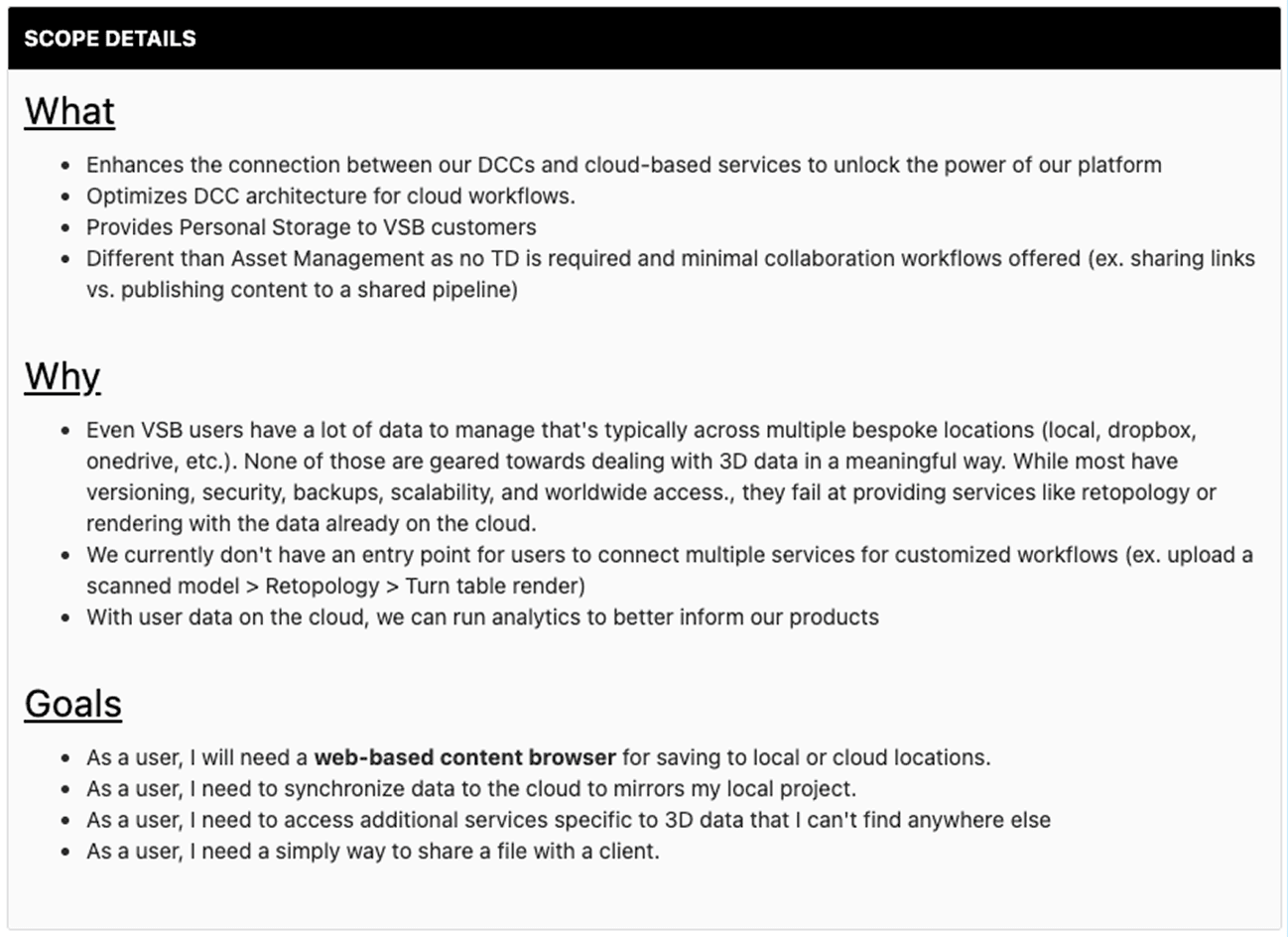
This is the project brief provided by the PM—the starting point I had to work with to define and shape the product direction.
Concept
Early conversations with the PM helped shape a high-level concept of what this product could become over time. It outlined a future where cloud storage connects multiple tools and workflows, but at this stage it was still too broad to design against directly.
To make this vision more tangible, I created low-fidelity concept designs that illustrated how the experience could work end to end. This helped align the team, especially product and leadership, on where the feature was heading. It also gave the PM a clearer way to communicate and advocate for the initiative internally.
From there, I focused on narrowing this vision into a well-defined and achievable MVP.
Persona
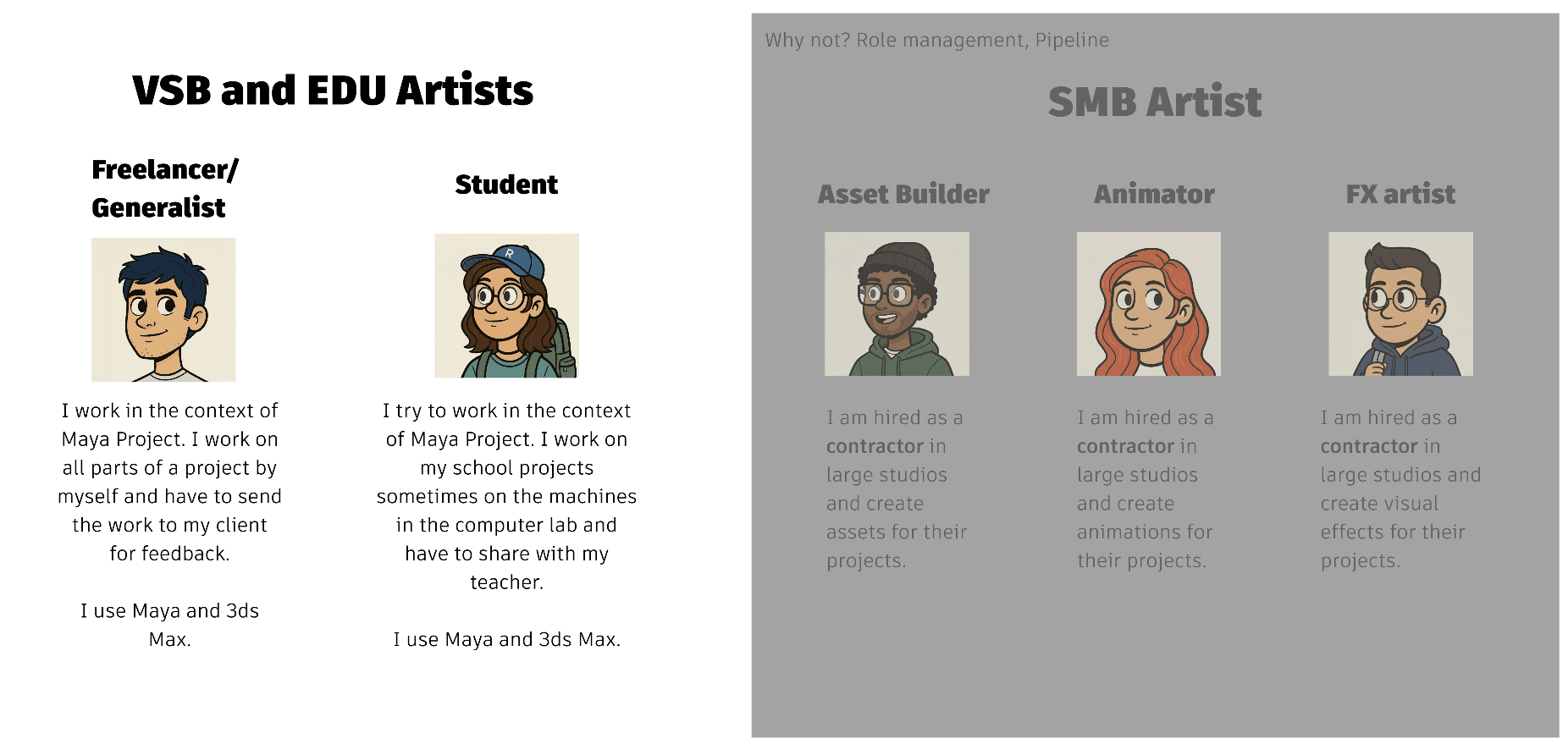
To anchor the work in real user needs, I defined a primary persona representing freelancers, students, and generalist creators. These users typically work independently, manage their own assets, and do not rely on complex pipelines. This helped shift the conversation from system capabilities to actual user workflows.
In addition, I explicitly defined who was not the target user, such as large studios and enterprise teams with established asset management systems. This helped keep the project focused and ensured we were designing for the right level of complexity.
User Value for MVP
With the persona defined, I articulated a clear user value for the MVP. The goal was simple: enable users to safely store and access their work across devices without worrying about broken dependencies or losing data. This became the foundation for all product decisions moving forward.
"As a user I want to back up a project on Cloud personal storage so I can open the same project in another machine without worrying about broken dependencies and I don't risk data loss."
My Impact during Problem Framing
Helped align PM, PO, and engineering on a clear user-centered scope and an achievable MVP.
Research and Discovery
Knowledge Gathering (Internal Tools)
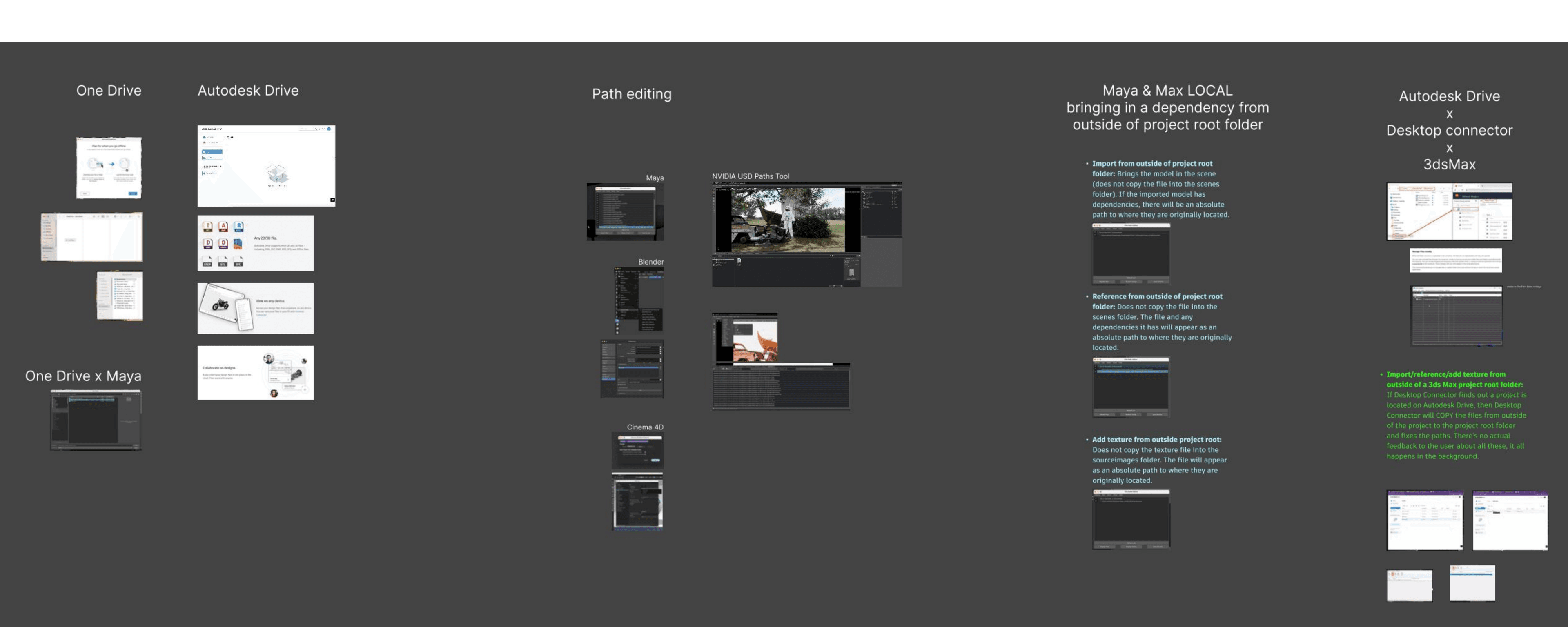
I started by looking at how this problem is currently handled within Autodesk. I explored tools like Autodesk Drive, Desktop Connector, and OneDrive integrations to understand how users interact with cloud storage today.
These solutions made it possible to move files between local and cloud environments, but they also revealed gaps. The experience often felt disconnected from how 3D workflows are actually structured, especially when working across multiple tools.
Knowledge Gathering (External Tools)
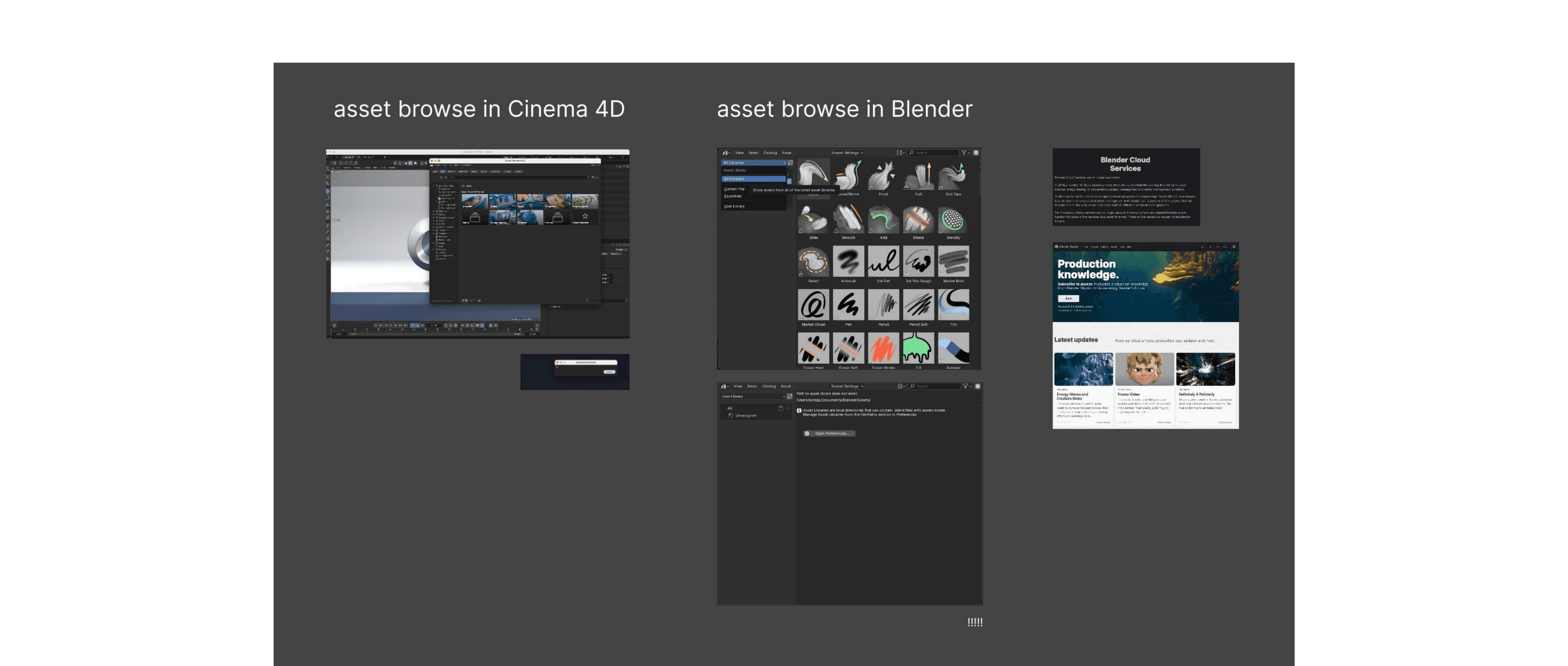
To broaden the perspective, I looked at how external tools approach similar problems. Blender and Cinema4D, for example, introduce cloud access through built-in asset browsers.
While these provide a centralized way to browse and access assets, they tend to impose a rigid structure that does not always align with how users organize their work. This highlighted a common tradeoff in the industry between accessibility and flexibility.
Design Iteration
As I compared these approaches, a key issue started to emerge around file dependencies.
In 3D workflows, a single scene rarely exists in isolation. It depends on textures, references, shaders, and other assets that live in different locations. My analysis showed that when assets are imported from outside a project, they often keep absolute paths, and those dependencies are not automatically managed.
This means that simply moving a file or changing its location can break the entire scene.
At this point, it became clear that treating files as independent units in the cloud would not work reliably.
Key Design Insight
The initial idea was to integrate cloud storage into Maya through the Open and Save experience, allowing users to store individual files in the cloud.
However, given the dependency issues, this approach would likely lead to broken references and an inconsistent experience.
This led me to reframe the problem. Instead of asking how to store files in the cloud, I asked what unit of work users actually rely on.
The answer was the Maya project. A project already contains the full structure of a user's work, including scenes, textures, references, and supporting files.
By shifting the design from file-based storage to project-based storage, dependencies could be preserved and the workflow would remain intact. This became a foundational decision for the rest of the design.
User Research to Validate
To validate this direction, I conducted an observational interview with a QA engineer who also teaches Maya. I asked him to walk me through how he introduces students to starting a new project.
What I observed was consistent and straightforward. Every workflow began with creating a project, which automatically establishes the folder structure before any files are created or edited.
This confirmed that the project is the natural starting point for users. It also reinforced that introducing cloud interaction at this stage would align with existing mental models, while significantly reducing the risk of broken dependencies.
List of Requirements
Following the research and validation phase, I translated the insights into a set of product requirements that defined the MVP scope. I iterated on them with the PM, PO, and engineering team to align on feasibility and scope, turning the validated direction into a clear and actionable plan for development. This step helped turn an abstract idea into a shared understanding of what we were building and why.
Here is the list of requirements:
- User is able to create a project in cloud personal storage and have all the standard folders and hierarchy created in cloud
- User is able to set the project to a cloud project
- User is able to receive proper feedback that a set project is on cloud
- User is able to create a new scene in the set cloud project
- User is able to save as the new scene in the set cloud project's “Scenes” folder
- User has access to Maya save options when saving to set cloud project
- User is able to open a scene from the set cloud project
- User has access to Maya open options when opening from a set cloud project
- User is able to incrementally save a scene to the set cloud project
- User is able to see the status of opening/saving a scene through Flow desktop service
- User is able to import a file from “Scenes” folder of the set cloud project
- User is able to reference a file from “Scenes” folder of the set cloud project
- User is able to add texture to objects from “SourceImages” folder of the set cloud project
- If user imports a model from outside of set cloud project, any possible dependencies are fixed upon saving the scene
- If user references a model from outside of set cloud project, any possible dependencies are fixed upon saving the scene
- If user adds texture from outside of set cloud project, any possible dependencies are fixed upon saving the scene
My Impact during Research and Discovery
Identified file dependency risks and uncovered that Maya projects, not individual files, should be the unit of cloud storage.
Design
User Journey
With the key insight that cloud interaction should happen at the project level, I focused on defining the end-to-end user journey before designing any UI.
Instead of jumping into screens, I explored multiple iterations of how a user would create, access, and manage a cloud-based Maya project. The goal was to ensure the flow aligned with existing workflows while preserving dependencies and minimizing friction.
This approach allowed me to validate the concept early and make changes quickly, without the overhead of detailed interface design.
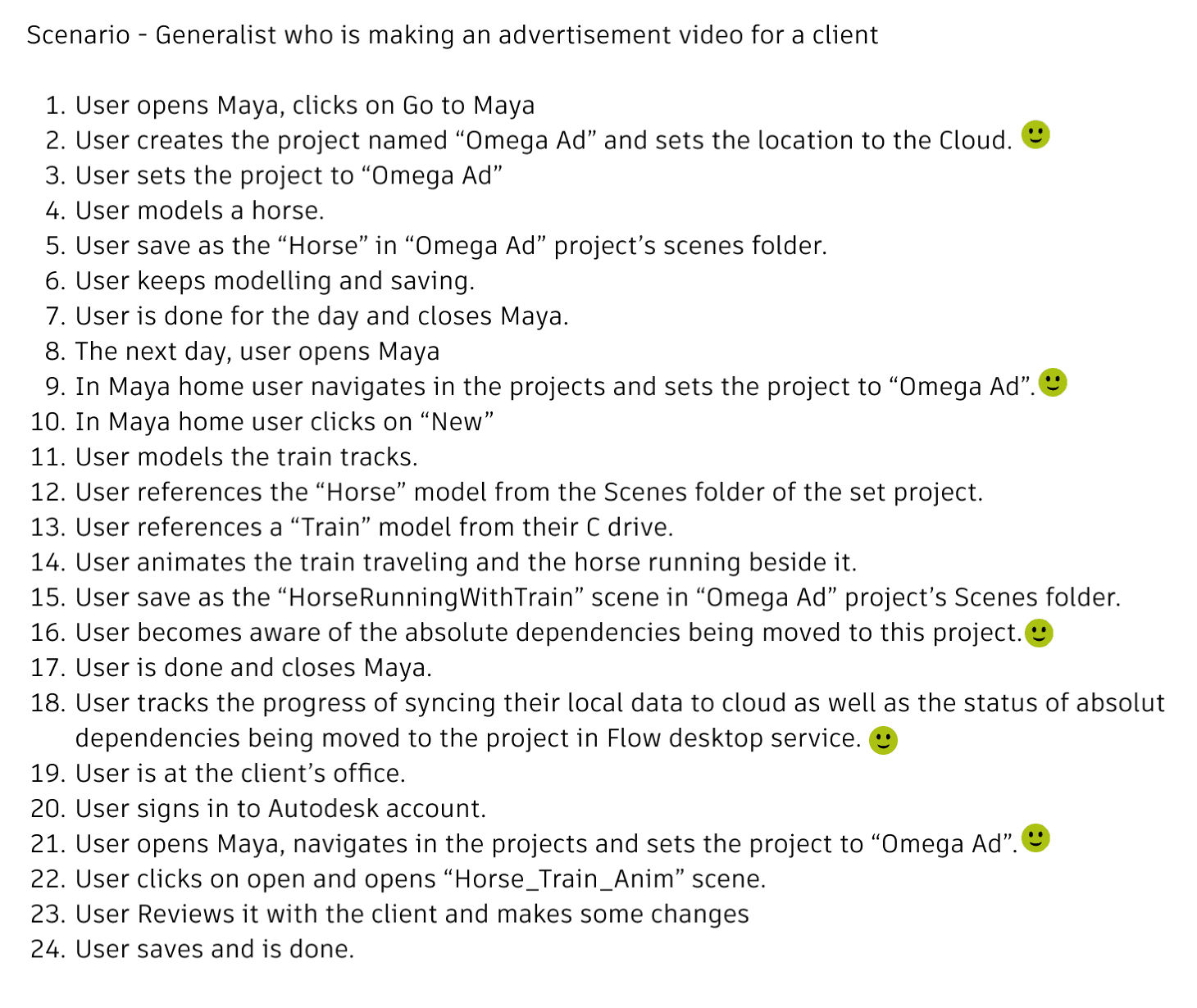
Mid-Fidelity Designs
Once the journey was clearly defined, I translated the flows into mid-fidelity designs in Figma.
At this stage, the focus was on making the experience tangible for the team. The designs outlined how users would move through the workflow, how cloud interactions would be introduced, and how key moments like project creation and asset management would function.
These artifacts made it easier to align across product, design, and engineering before committing to final UI decisions.
Figma prototype of the user journey
Review and Iterate
I shared these designs with the PM, PO, engineering team, and the broader design team to gather feedback.
Through these reviews, I refined several parts of the experience. One example was the dependency packaging interaction, where I iterated on how to communicate what assets are included in a cloud project and how to prevent missing references.
This collaborative step helped ensure the solution was not only usable, but also realistic to implement within the system constraints.
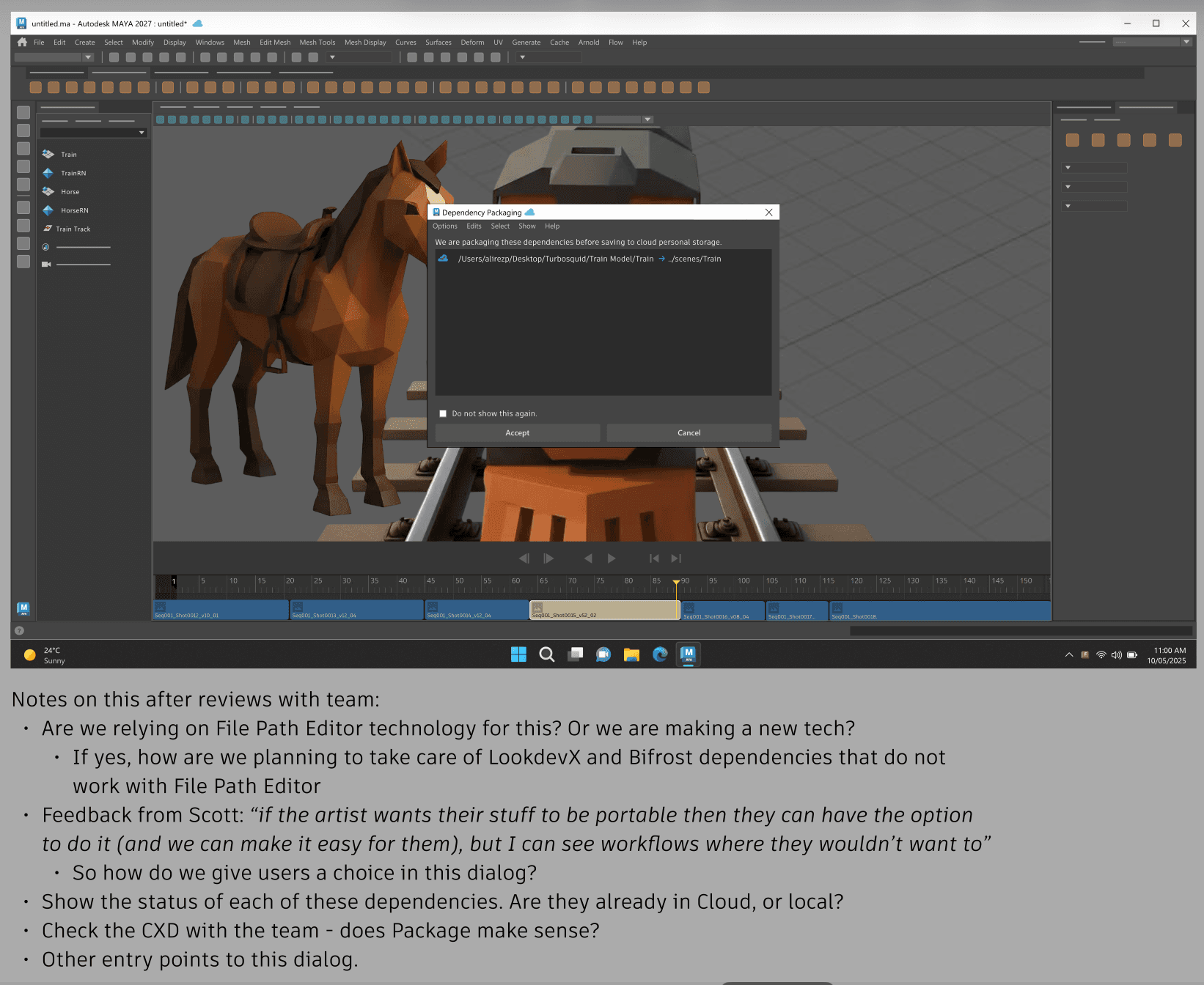
Comments gathered from the broad design team on the “dependency packaging” window after reviewing with them
Sent for Development
After incorporating feedback, I finalized the designs and prepared them for implementation.
I created high-fidelity designs and translated the flows into user stories in JIRA, making sure the requirements and interactions were clearly documented for the engineering team.
Shortly after this, I transitioned to another team, but the work was structured to support a smooth handoff and continued development.
My Impact during Design
Established a project-based cloud workflow that preserved dependencies and provided a practical foundation for implementation.
What I learned
- Defining the problem space early through persona, user value, and requirements can significantly improve alignment and reduce ambiguity across teams.
- In complex systems, understanding technical constraints such as file dependencies is critical to making the right design decisions.
- Iterating on user journeys before moving into UI design helps explore solutions more efficiently and avoids costly rework later.